
home > support > using Excel to create a series of dates
Using Excel to create a series of dates
This screencast takes you through:
- Creating a series of dates using Microsoft Excel
- Making the data ready to import into TourCMS
The process outlined within this screencast (and explained below) outlines how to create multiple dates at the same time (the most efficient way of solving this problem):
Duration: 3 minutes
The following steps describe exactly the steps followed in the screencast above:
Step 1: Create your tour departure start dates
- Open up Microsoft Excel (or other spreadsheet software)
- In one cell, put a start date
- In the cell below, put a subsequent start date. If you are going to produce dates for "Every Saturday" this 2nd date should be 7 days later than the first date
- Highlight both dates
- With your mouse, select the bottom right hand corner of the 2nd date - and scroll down - new dates will be created
Step 2: Create your end dates
Each departure needs both a start and an end date
- If you are running a day trip, the end date will be same as the start date
- Using Excel, you can create the end date column to add a default duration to the start date. The format for the end date column is =b5+7 (where b5 is the cell address for the start date and 7 is the default duration)
Step 3: Add your prices
As a minimum you need a sale price and a supplier cost
- Paste your created dates into Notepad (or other text editing software)
- Remove the gap between the two dates (start and end date) and replace with a comma
- Add your sale price and supplier cost (can be different per date) as well as your departure product code (if required). Pay attention regarding the number of commas you use
Step 4: Copy and paste into TourCMS
Go to a tour, into dates & prices, then Create multiple departures
- Paste your data from Notepad into the box
- Ensure that you tick Enable booking immediately (i.e. not manually closed) otherwise you will have to open up for sale each date individually (which could take rather a long time, if you are adding multiple dates)
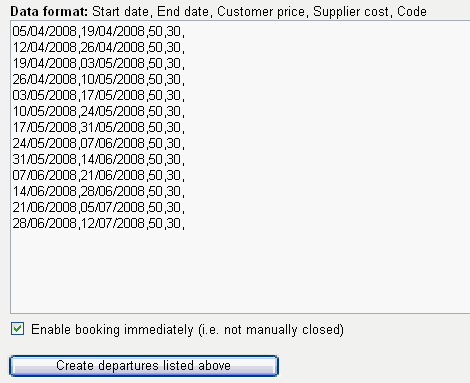
- Remember there is no "mass delete" - so check your dates and prices before you load them! (you can delete individual dates only)
- The date format will be whatever date format you have configured for your account (for example US style, European style or Chinese style)
- If you have configured multiple rate types (perhaps adult, child, concession etc, rather than just a single rate) then pay attention regarding the format that TourCMS requires for these rates. This will be explained on the mass departures loading screen within TourCMS, depending upon your settings for that tour
- If you have a series of dates that operate on Monday, Tuesday and Wednesday (but not other days of the week) do all Mondays, then all Tuesdays then all Wednesdays. This will probably be easier to work out than playing with Excel to do complex date schemes
In Excel, if when pasting, you see something like this:
16/10/2008,03/11/2008, 2750 ,0, codeThen use a cell function like =A1&B1&C1 which would give you
16/10/2008,03/11/2008,2750,0,codei.e. the ampersand & can be used as a function to merge cells without spaces.
Alternative Excel method
Excel supports the export of data in CSV (Comma Separated Value) type. First, enter your dates into Excel as detailed above, and then save the file as a CSV type. Then, open this file in Notepad (right click and 'open with'). You will then see your list of dates & prices, complete with commas and without any gaps.