
home > features > web design & CMS
Web design & CMS
Create manageable, search engine friendly websites
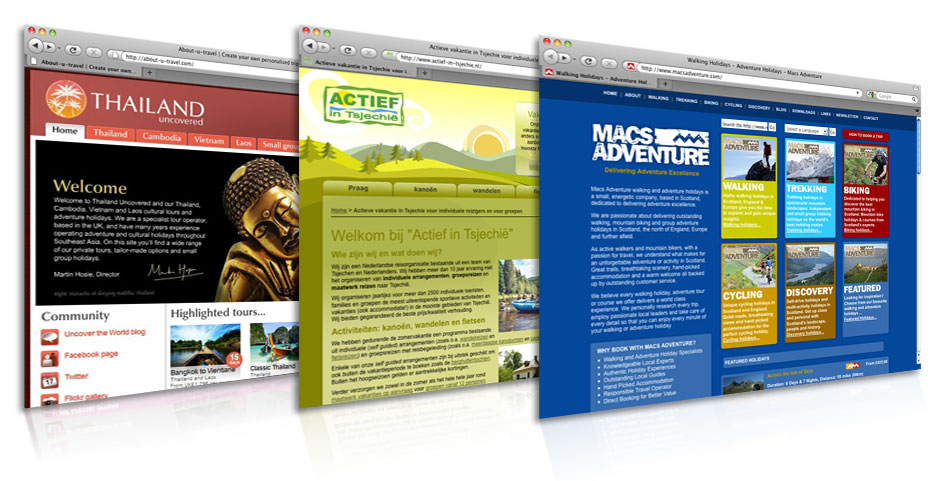
The web design capabilities of TourCMS are one if its key strengths vs competitor products.
Multiple websites can be managed from the same account. For example if you have tours in France, Spain and Italy - you could produce 3 individual websites - each marketed directly to interested customers. Each website would only have relevant tours on. Alongside these indivdiual sites you could also run a central website - with all tours from all 3 countries presented.
Search Engine Optimization (SEO) is an increasingly important tool in promoting your website, TourCMS automatically generates Search Engine Friendly URLs which you can edit on a per-page basis. Additionally, HTML tags are under the control of the developer and it's possible to create custom page titles and meta tags for each product you sell.
You don't have to use TourCMS as a website content management system (CMS). You could just add a booking engine to an existing website (a great way to get up and running) or a website managed by a 3rd party CMS (WordPress, Joomla etc). Learn more about factors influencing this decision.
Tools for everyone
Simple tools for staff
- Update product descriptions and other content using a familiar wordprocessor style interface (WYSIWYG)
- Upload and organise photos and diagrams related to your products
- No need to load prices separately, latest prices pulled straight from the reservation system
Unrestrictive tools for designers & developers
- Tag system allows designers the freedom to layout pages however they like, good designers can shine
- Enquiry API to allow quick creation of complex brochure request forms, contact us forms etc
- Free sample code and tutorials
- Knowledgable support staff who speak your developer's language
Powerful tools for distribution
- Content loaded into TourCMS can be distributed to third parties via The Marketplace
- Generate Widgets, single line JavaScript snippets which allow your partners to feature your products on their website; they will show your latest content and prices
How it works (the technical bit)
Templates containing specially formatted tags are loaded into TourCMS; some can be "Single page templates" whereby a single template creates a single page; others can be "Repeating templates" where a single template is used to produce multiple pages (say a page for each of your Tours). When you rebuild part or all of your website, TourCMS processes these templates, generates your web pages and sends them via FTP to your website.
TourCMS templates can be used to create most text-based file formats (HTML, XHTML, CSS, JavaScript, XML, CSV, PHP etc) including utf-8 character encoding so multi-language and non-latin based languages are no problem.
All TourCMS accounts come with a simple set of default templates which are designed to help designers/developers get used to building websites with TourCMS, just load in your FTP details and hit rebuild to try them out.
Sites shown on this page
Thailand Uncovered, Macs Adventure (by Dojo Design Studio), Actief in Tsjechie
More customer websites can be found in the Customer Testimonials.